Use Cases
Persistent Agent Memory in LangGraph
Build stateful AI agents with LangGraph memory persistence. Implement checkpointers, long-term memory stores, and cross-session state.
Mar 10, 2026
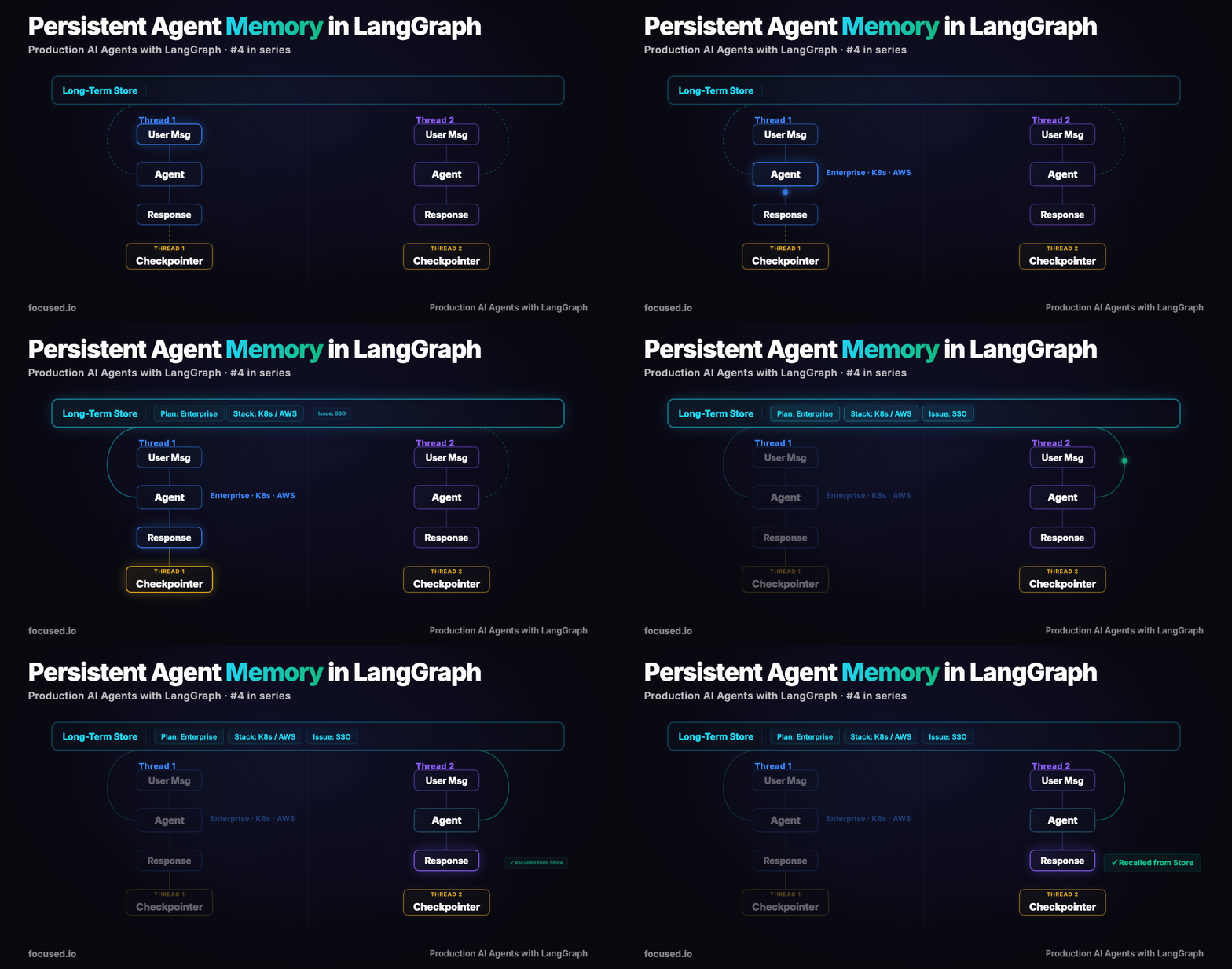
Most agents, when they get into production fail because they have no persistent state, or long term memory.
A person contacts support about an SSO issue in a Kubernetes deployment and they've already provided the relevant context in a previous conversation: Enterprise plan, cluster environment, integration details.
The agent asks for the same information again.
Nothing is broken in the agent flow, the agent simply doesn't remember key details across conversations. Every chat starts with an empty context window, so the model has to re-collect the same information before it can reason about the problem.
If you use LangGraph, it provides two memory mechanisms that address different layers of this problem. Most implementations only use the first, short term memory.
The Two Memory Types
Without the checkpointer, every invoke call is a fresh conversation. Without the Store, every new thread is a fresh relationship. You need both.
The Architecture
                    ┌─────────────────────────────────┐
                    │         InMemoryStore           │
                    │   ("memories", user_id)         │
                    │   ┌─────────┐ ┌─────────┐       │
                    │   │ prefs   │ │ facts   │  ...  │
                    │   └─────────┘ └─────────┘       │
                    └──────────┬──────────────────────┘
                               │ search / put
                               ▼
[User Message] → [Load Memories] → [Agent] → [Extract & Save Memories] → [Response]
                                      │
                                      ▼
                              ┌───────────────┐
                              │ InMemorySaver │
                              │  (thread_id)  │
                              │  checkpoint   │
                              └───────────────┘
The checkpointer is invisible to the developer and end user. LangGraph handles it automatically when you compile with checkpointer=. The Store requires explicit read/write in your node functions. That asymmetry, automatic vs coded, is deliberate: conversation history is structural while long-term memory is a product decision and full of complexity.
Short-Term Memory Persistence: The Checkpointer
The checkpointer saves a snapshot of graph state at every super-step. Pass a thread_id in config, and LangGraph will restore state from the last checkpoint for that thread. No code changes to your nodes.
from langchain_anthropic import ChatAnthropic
from langchain_core.messages import HumanMessage, SystemMessage
from langgraph.checkpoint.memory import InMemorySaver
from langgraph.graph import StateGraph, START, END, MessagesState
from langsmith import traceable

llm = ChatAnthropic(model="claude-sonnet-4-5-20250929", temperature=0)


@traceable(name="support_agent", run_type="chain")
def call_model(state: MessagesState) -> dict:
    response = llm.invoke([
        SystemMessage(
            content="You are a customer support agent. Be helpful and concise. "
                    "Reference earlier parts of the conversation when relevant."
        ),
        *state["messages"],
    ])
    return {"messages": [response]}


builder = StateGraph(MessagesState)
builder.add_node("agent", call_model)
builder.add_edge(START, "agent")
builder.add_edge("agent", END)

checkpointer = InMemorySaver()
graph = builder.compile(checkpointer=checkpointer)
Using it across turns:
config = {"configurable": {"thread_id": "customer-session-42"}}

result1 = graph.invoke(
    {"messages": [HumanMessage(content="I'm on the Enterprise plan and my SSO is broken.")]},
    config=config,
)

result2 = graph.invoke(
    {"messages": [HumanMessage(content="The error code is SSO-403.")]},
    config=config,
)
print(result2["messages"][-1].content)
The second call knows about the Enterprise plan and SSO context because the checkpointer restored the full conversation.
For production, swap InMemorySaver for PostgresSaver:
from langgraph.checkpoint.postgres import PostgresSaver

checkpointer = PostgresSaver.from_conn_string(
    "postgresql://user:pass@localhost:5432/langgraph"
)
InMemorySaver is a dictionary, so it disappears when the process dies. This is fine for development and tests. We like PostgresSaver for production.
Long-Term Memory for Stateful Agents: The Store
The checkpointer solves session continuity while the Store solves relationship continuity. A returning customer opens a new thread, or new converstion with different thread_id, the agent should still knows their setup.
The Store organizes memories as JSON documents under namespaces. Think of namespaces as directories: ("memories", "user-123") scopes all memories to a specific user. Each memory has a key (like a filename) and a value (any JSON-serializable dict).
import uuid

from langgraph.checkpoint.memory import InMemorySaver
from langgraph.store.memory import InMemoryStore
from langgraph.graph import StateGraph, START, END, MessagesState
from langchain_anthropic import ChatAnthropic
from langchain_core.messages import HumanMessage, SystemMessage
from langsmith import traceable

llm = ChatAnthropic(model="claude-sonnet-4-6", temperature=0)

store = InMemoryStore()
checkpointer = InMemorySaver()
Saving Memories
After the agent responds, extract useful facts and persist them. The extraction step is an LLM call, you're asking the model to identify what's worth remembering.
@traceable(name="extract_memories", run_type="chain")
def extract_and_save_memories(state: MessagesState, store, config) -> dict:
    user_id = config["configurable"].get("user_id", "anonymous")
    namespace = ("memories", user_id)

    conversation = "\n".join(
        f"{m.type}: {m.content}" for m in state["messages"][-4:]
    )

    extraction = llm.invoke([
        SystemMessage(
            content="Extract key facts about this user from the conversation. "
                    "Return each fact on its own line. Only extract concrete, "
                    "reusable facts (plan type, tech stack, preferences, issues). "
                    "If there are no new facts, respond with NONE."
        ),
        HumanMessage(content=f"Conversation:\n{conversation}"),
    ])

    if "NONE" not in extraction.content.upper():
        facts = [f.strip() for f in extraction.content.strip().split("\n") if f.strip()]
        for fact in facts:
            memory_id = str(uuid.uuid4())
            store.put(namespace, memory_id, {"memory": fact})

    return state
Loading Memories
Before the agent responds, search the Store for relevant memories and inject them into the system prompt.
@traceable(name="load_memories", run_type="chain")
def load_memories(state: MessagesState, store, config) -> dict:
    user_id = config["configurable"].get("user_id", "anonymous")
    namespace = ("memories", user_id)

    memories = store.search(namespace, limit=10)
    memory_text = "\n".join(f"- {m.value['memory']}" for m in memories)

    if memory_text:
        system_msg = SystemMessage(
            content=f"You are a customer support agent. Be helpful and concise.\n\n"
                    f"Known facts about this customer:\n{memory_text}\n\n"
                    f"Use these facts to personalize your response. "
                    f"Do not ask the customer to re-explain information you already know."
        )
    else:
        system_msg = SystemMessage(
            content="You are a customer support agent. Be helpful and concise."
        )

    return {"messages": [system_msg] + state["messages"]}


@traceable(name="support_agent", run_type="chain")
def call_model(state: MessagesState) -> dict:
    response = llm.invoke(state["messages"])
    return {"messages": [response]}
Graph Assembly
Wire it together: load memories, call the agent, extract and save new memories.
builder = StateGraph(MessagesState)
builder.add_node("load_memories", load_memories)
builder.add_node("agent", call_model)
builder.add_node("save_memories", extract_and_save_memories)

builder.add_edge(START, "load_memories")
builder.add_edge("load_memories", "agent")
builder.add_edge("agent", "save_memories")
builder.add_edge("save_memories", END)

graph = builder.compile(checkpointer=checkpointer, store=store)
Cross-Thread Memory in Action
Watch the agent remember across completely separate conversations:
config_thread_1 = {
    "configurable": {"thread_id": "session-1", "user_id": "user-42"}
}

result1 = graph.invoke(
    {"messages": [HumanMessage(
        content="Hi, I'm on the Enterprise plan. We run Kubernetes "
                "on AWS and we're having trouble with SSO integration."
    )]},
    config=config_thread_1,
)
print("Thread 1:", result1["messages"][-1].content[:200])

config_thread_2 = {
    "configurable": {"thread_id": "session-2", "user_id": "user-42"}
}

result2 = graph.invoke(
    {"messages": [HumanMessage(
        content="Hey, I have a question about scaling our deployment."
    )]},
    config=config_thread_2,
)
print("Thread 2:", result2["messages"][-1].content[:200])
In thread 2, the agent already knows the customer is on Enterprise, running Kubernetes on AWS. No re-asking. The memory came from the Store, scoped to user-42, not from the checkpointer (which only holds thread 1's conversation).
For production, swap InMemoryStore for PostgresStore:
from langgraph.store.postgres import PostgresStore

store = PostgresStore.from_conn_string(
    "postgresql://user:pass@localhost:5432/langgraph"
)
Memory with Semantic Search
Flat store.search() returns all memories in a namespace up to the limit. That works fine when a user has 5 memories. At 500, you're stuffing irrelevant facts into the context window and paying for tokens that hurt more than they help.
InMemoryStore supports an index parameter for semantic search. Pass an embedding function and the store will rank memories by relevance to the current query:
from langchain_openai import OpenAIEmbeddings

embeddings = OpenAIEmbeddings(model="text-embedding-3-small")

store = InMemoryStore(
    index={
        "embed": embeddings,
        "dims": 1536,
        "fields": ["memory"],
    }
)
Now store.search() accepts a query parameter:
@traceable(name="load_memories_semantic", run_type="chain")
def load_memories(state: MessagesState, store, config) -> dict:
    user_id = config["configurable"].get("user_id", "anonymous")
    namespace = ("memories", user_id)

    last_message = state["messages"][-1].content
    memories = store.search(namespace, query=last_message, limit=5)

    memory_text = "\n".join(f"- {m.value['memory']}" for m in memories)

    if memory_text:
        system_msg = SystemMessage(
            content=f"You are a customer support agent. Be helpful and concise.\n\n"
                    f"Relevant facts about this customer:\n{memory_text}\n\n"
                    f"Use these facts to personalize your response."
        )
    else:
        system_msg = SystemMessage(
            content="You are a customer support agent. Be helpful and concise."
        )

    return {"messages": [system_msg] + state["messages"]}
The difference: when the customer asks about billing, you pull billing-related memories instead of their entire history. Fewer tokens, more relevant context, better responses.
Production Failures
These are the failures that show up after memory has been running in production for a few weeks.
1. Memory Bloat. The extraction node saves a new memory for every turn. After 50 conversations, user-42 has 300 memories, half of them redundant ("User is on Enterprise plan" saved 12 times). Token costs climb, context window fills with repetitive facts, and response quality actually decreases. Fix: deduplicate before saving. Check if a semantically similar memory already exists:
@traceable(name="deduplicated_save", run_type="chain")
def save_memory_deduped(store, namespace: tuple, fact: str) -> bool:
    existing = store.search(namespace, query=fact, limit=3)
    for mem in existing:
        if mem.value["memory"].lower().strip() == fact.lower().strip():
            return False
    memory_id = str(uuid.uuid4())
    store.put(namespace, memory_id, {"memory": fact})
    return True
2. Stale Memories. The customer upgraded from Pro to Enterprise two months ago. Both facts are in the Store. The agent says "As a Pro customer..." — a worse experience than having no memory at all. Fix: timestamp your memories and either overwrite by category or implement a TTL sweep:
from datetime import datetime, timezone

store.put(namespace, "plan-type", {
    "memory": "Customer is on Enterprise plan",
    "category": "plan",
    "updated_at": datetime.now(timezone.utc).isoformat(),
})
Using a deterministic key like "plan-type" instead of a UUID means the next update overwrites the old value. Category-based keys are the simplest fix for facts that change.
3. Namespace Collisions. Two systems write memories for the same user under different namespace conventions — one uses ("memories", user_id), the other uses ("user_data", user_id). Neither system sees the other's data. There's no error — just incomplete context. Fix: document your namespace convention in an ADR and enforce it with a helper function:
def user_namespace(user_id: str) -> tuple:
    return ("memories", user_id)
4. Memory Extraction Hallucination. The extraction LLM invents facts that weren't in the conversation. The customer mentions "we're considering Kubernetes" and the extraction saves "Customer runs Kubernetes in production." Once that fact is in the Store, the agent references it confidently, and now you have a support interaction based on false premises. Fix: use structured output for extraction and add a confidence threshold:
from pydantic import BaseModel, Field


class ExtractedFact(BaseModel):
    fact: str = Field(description="A concrete fact stated by the user")
    confidence: float = Field(description="0.0-1.0 confidence this fact is accurate")


class ExtractionResult(BaseModel):
    facts: list[ExtractedFact] = Field(default_factory=list)


structured_llm = llm.with_structured_output(ExtractionResult)
Only save facts with confidence above 0.8. You'll miss some, but you won't fabricate any.
Observability
Memory operations are invisible without tracing. The @traceable decorator on load_memories and extract_and_save_memories gives you per-node spans in LangSmith. Tag traces with the user_id for filtering:
from langsmith import tracing_context

with tracing_context(
    metadata={"user_id": "user-42", "memory_count": 15},
    tags=["production", "memory-v2"],
):
    result = graph.invoke(
        {"messages": [HumanMessage(content="What's the status of my SSO issue?")]},
        config={"configurable": {"thread_id": "session-5", "user_id": "user-42"}},
    )
The three things to watch in LangSmith:
- Memory load latency — if
load_memoriesis slow, your Store query is the bottleneck. Semantic search with large namespaces will do this. - Extraction quality — open the
extract_memoriesspan and read the output. If you see hallucinated facts, tighten the extraction prompt or add structured output. - Memory count per user — if it's growing linearly with conversations, you're not deduplicating.
Evals
Memory systems need two types of evaluation: does the agent recall stored information, and does the agent correctly use that information? Shipping without these evals means memory bugs are invisible until a customer complains.
from langsmith import Client

ls_client = Client()

dataset = ls_client.create_dataset(
    dataset_name="memory-persistence-evals",
    description="Evaluates cross-thread memory recall and usage",
)

ls_client.create_examples(
    dataset_id=dataset.id,
    inputs=[
        {
            "setup_messages": [
                "I'm on the Enterprise plan running Kubernetes on AWS.",
                "My preferred contact method is Slack.",
            ],
            "test_question": "Can you help me scale my deployment?",
            "user_id": "eval-user-1",
        },
        {
            "setup_messages": [
                "We use PostgreSQL 15 and our database is hosted on RDS.",
            ],
            "test_question": "I'm seeing slow queries. Any suggestions?",
            "user_id": "eval-user-2",
        },
        {
            "setup_messages": [
                "I'm on the Pro plan. I prefer detailed, technical explanations.",
            ],
            "test_question": "How do I configure SSO?",
            "user_id": "eval-user-3",
        },
    ],
    outputs=[
        {"must_recall": ["Enterprise", "Kubernetes", "AWS"]},
        {"must_recall": ["PostgreSQL", "RDS"]},
        {"must_recall": ["Pro", "technical"]},
    ],
)
from langsmith import evaluate
from openevals.llm import create_llm_as_judge
MEMORY_QUALITY_PROMPT = """\
The user previously told the agent the following facts:
{inputs[setup_messages]}
The user then asked (in a NEW conversation thread):
{inputs[test_question]}
The agent responded:
{outputs[response]}
Rate 0.0-1.0 on whether the agent correctly recalled and used the stored facts.
A score of 1.0 means the agent referenced all relevant prior facts naturally.
A score of 0.0 means the agent showed no awareness of prior interactions.
Return ONLY: {{"score": <float>, "reasoning": "<explanation>"}}"""
memory_judge = create_llm_as_judge(
prompt=MEMORY_QUALITY_PROMPT,
model="anthropic:claude-sonnet-4-5-20250929",
feedback_key="memory_quality",
)
def memory_recall(inputs: dict, outputs: dict, reference_outputs: dict) -> dict:
"""Check if specific facts were recalled in the response."""
response_text = outputs.get("response", "").lower()
must_recall = reference_outputs.get("must_recall", [])
hits = sum(1 for term in must_recall if term.lower() in response_text)
return {
"key": "memory_recall",
"score": hits / len(must_recall) if must_recall else 1.0,
}
def target(inputs: dict) -> dict:
test_store = InMemoryStore()
test_checkpointer = InMemorySaver()
test_graph = builder.compile(checkpointer=test_checkpointer, store=test_store)
user_id = inputs["user_id"]
for i, msg in enumerate(inputs["setup_messages"]):
test_graph.invoke(
{"messages": [HumanMessage(content=msg)]},
config={"configurable": {
"thread_id": f"setup-{user_id}-{i}",
"user_id": user_id,
}},
)
result = test_graph.invoke(
{"messages": [HumanMessage(content=inputs["test_question"])]},
config={"configurable": {
"thread_id": f"test-{user_id}",
"user_id": user_id,
}},
)
return {"response": result["messages"][-1].content}
results = evaluate(
target,
data="memory-persistence-evals",
evaluators=[memory_judge, memory_recall],
experiment_prefix="memory-persistence-v1",
max_concurrency=2,
)
The memory_recall evaluator is the one that catches the most regressions. If you change the extraction prompt and recall drops from 0.9 to 0.6, you know immediately. Without it, you find out from customer complaints three weeks later.
When to Use This
Use checkpointer + Store when:
- Customers interact across multiple sessions and expect continuity
- Your agent asks repetitive setup questions that waste customer time
- You need to personalize responses based on user history
- Compliance requires maintaining an audit trail of what the agent "knows"
Use checkpointer only when:
- All interactions are single-session (no returning customers)
- Privacy requirements prohibit storing user data across sessions
- Your use case is stateless Q&A (FAQ bot, code assistant)
Skip both when:
- Every request is independent (API endpoint, batch processing)
- You're already managing state externally (e.g., a CRM integration that passes context)
The Bottom Line
LangGraph memory is two separate mechanisms and they should be treated that way. The checkpointer is infrastructure. Enable it so the graph can persist state within a thread and move on. The Store is different. It’s an application design problem where you need to decide what information is worth persisting, how it should be scoped, and when it should be removed.
For development, start with InMemorySaver and InMemoryStore. They’re simple and make it easy to validate memory behavior before introducing external persistence layers. Before expanding extraction logic, write a memory recall evaluation. If the agent cannot reliably retrieve stored facts, adding more extraction prompts will only increase noise in the system.
Use deterministic keys for attributes that change over time such as plan type or contact preferences, and use UUIDs for records that accumulate such as past issues or interaction summaries. Finally, add deduplication on the write path. Without it, memory stores grow quickly and retrieval quality degrades over time. This is a common failure mode in long-running agent systems.
We’ll use the information you provide to respond to your enquiry. Learn more about how we handle your personal data in our Privacy Policy.
/Contact Us

Modernize your legacy with Focused
Get in touch