Use Cases
Your Customer Service Bot Is Slow Because It's Single-Threaded
Cut agent response times in half with parallel sub-agents in LangGraph, plus the failure modes that'll bite you in production.
Feb 19, 2026
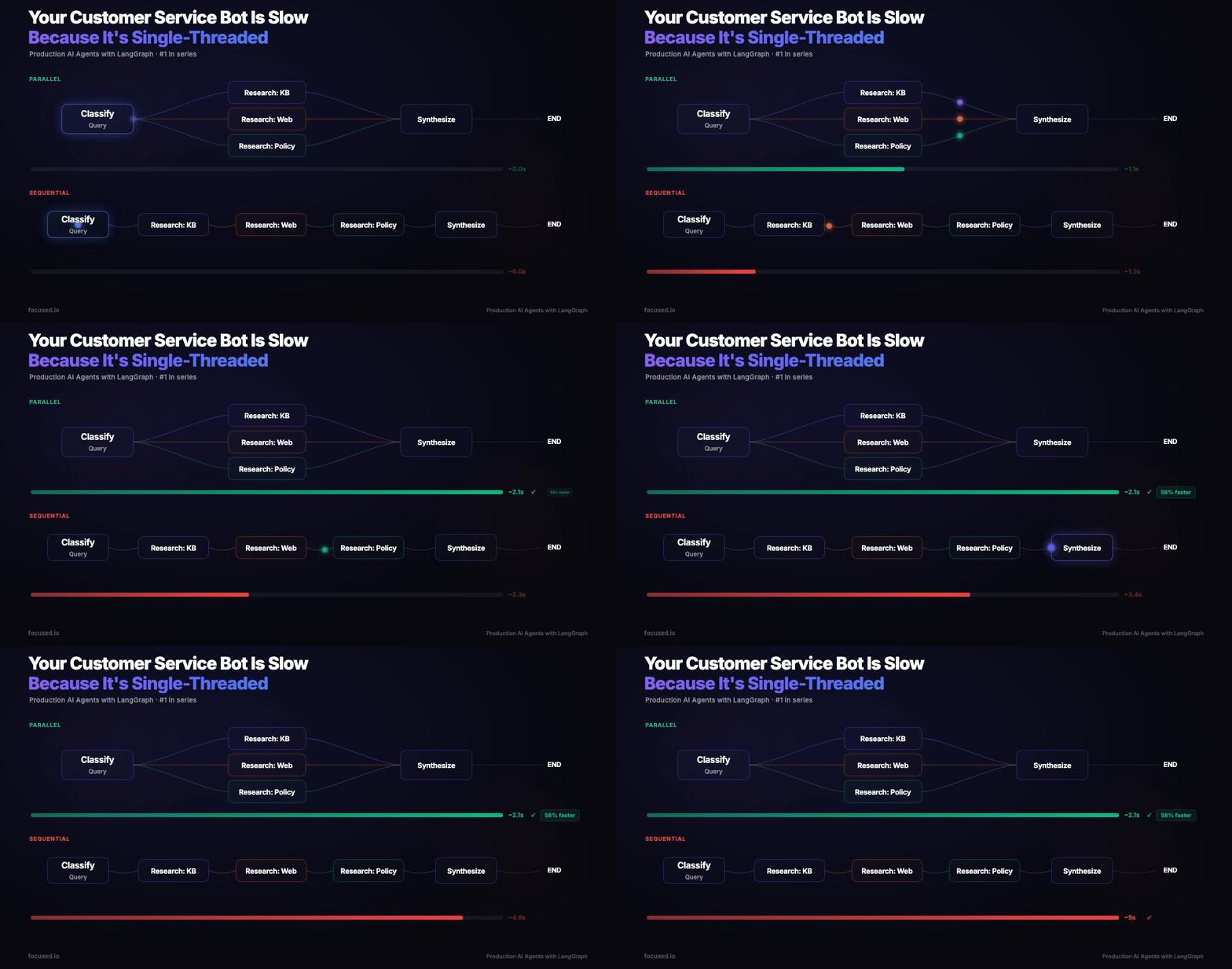
Consider a typical enterprise support agent. A customer asks a complex compliance question and the agent dutifully queries the knowledge base, then searches the web, then checks policy docs. Sequential. Three LLM calls back to back. That's ~12 seconds of wall time.
Users start abandoning chat around 8.
Fan out those three research calls in parallel, same calls, same models, same prompts, and wall time drops to ~6.5 seconds.
This post covers the parallel sub-agent pattern using LangGraph and LangSmith. I'll show the code, but more importantly, I'll show you the failure modes because the pattern is simple and the bugs are not.
The Latency Math
You have an agent that needs to hit three sources, internal KB, web search, and policy documents. Each LLM call takes 2–4 seconds. Sequentially:
In parallel, the three research steps overlap:
A 45% reduction from a structural change, not a prompt improvement. Every additional sub-agent you add sequentially costs another 2–4 seconds. In parallel, it's free, until you hit the slowest branch.
The Parallel Agents Architecture
We're building a research assistant that fans out to three parallel sub-agents, aggregates results, and synthesizes a response:
                     ┌→ [Research: KB]     ─┐
[Classify Query] ────┼→ [Research: Web]    ─┼→ [Synthesize] → END
                     └→ [Research: Policy] ─┘
LangGraph executes parallel branches in a superstep, all three branches run concurrently, state updates are transactional. The fan-in edge waits for all branches before proceeding.
On the Send API: LangGraph has a Send API for dynamic map-reduce where branch count is unknown at build time. Don't reach for it here. Send is designed for running the same node N times with different inputs. For a fixed set of specialist agents, static edges or conditional routing are simpler, preserve graph structure, and keep every branch visible at compile time via graph.get_graph().draw_mermaid(). In practice, you'll rarely need Send. Start with static fan-out, graduate to conditional, reach for Send as a last resort.
State: The One Thing You'll Get Wrong
The Annotated[list, operator.add] reducer tells LangGraph to **concatenate** results from parallel branches instead of overwriting them. Without it, parallel branches race to write the results field. The last branch to finish wins, and you silently lose the other two. This is one of the most common bugs in parallel agent systems. The synthesizer produces suspiciously narrow responses, coverage evals fail intermittently, and you spend two days blaming the prompt before realizing you're only getting one source's data.
The Code
State, a sub-agent factory, and three agent instances. The @traceable decorator ensures each agent appears as a distinct span in LangSmith — this will be the single most important debugging decision you make.
import operator
from typing import Annotated, TypedDict

from langchain_anthropic import ChatAnthropic
from langchain_core.messages import HumanMessage, SystemMessage
from langsmith import traceable

llm = ChatAnthropic(model="claude-sonnet-4-5-20250929", temperature=0)


class State(TypedDict):
    question: str
    research_results: Annotated[list[dict], operator.add]
    final_response: str


def make_agent(name: str, focus: str):
    """Factory that builds a traceable research sub-agent."""

    @traceable(name=name, run_type="chain")
    def node(state: State) -> dict:
        response = llm.invoke([
            SystemMessage(content=f"You are the {name} agent. Focus on {focus}. "
                                  "Return a concise summary. Cite your source type."),
            HumanMessage(content=f"Research query: {state['question']}"),
        ])
        return {"research_results": [{"source": name, "content": response.content}]}

    return node


kb_agent = make_agent("knowledge_base", "internal knowledge base searches.")
web_agent = make_agent("web_search", "recent news and industry trends.")
policy_agent = make_agent("policy", "compliance, legal, and regulatory frameworks.")
The synthesizer merges sub-agent outputs into one customer-facing response. The key constraint, worth knowing before you ship, is that policy information takes precedence. Without this, the synthesizer will cheerfully soften restrictions to sound more helpful.
@traceable(name="Synthesizer", run_type="chain")
def synthesize(state: State) -> dict:
    context = "\n\n".join(
        f"[{r['source']}]: {r['content']}" for r in state["research_results"]
    )
    response = llm.invoke([
        SystemMessage(
            content="Synthesize the following research into a clear, actionable "
                    "response. When policy information conflicts with or constrains "
                    "other responses, the policy statement takes precedence. "
                    "Never soften or omit policy restrictions."
        ),
        HumanMessage(
            content=f"Customer question: {state['question']}\n\n"
                    f"Research findings:\n{context}"
        ),
    ])
    return {"final_response": response.content}
Graph Assembly
Fifteen lines of wiring. RetryPolicy on every research node so a provider 429 doesn't kill the entire pipeline, successful branches are checkpointed and won't re-execute.
from langgraph.graph import StateGraph, START, END
from langgraph.types import RetryPolicy

builder = StateGraph(State)

builder.add_node("kb", kb_agent, retry=RetryPolicy(max_attempts=3))
builder.add_node("web", web_agent, retry=RetryPolicy(max_attempts=3))
builder.add_node("policy", policy_agent, retry=RetryPolicy(max_attempts=3))
builder.add_node("synthesize", synthesize)

builder.add_edge(START, "kb")
builder.add_edge(START, "web")
builder.add_edge(START, "policy")
builder.add_edge(["kb", "web", "policy"], "synthesize")
builder.add_edge("synthesize", END)

graph = builder.compile()
Conditional Routing: The Upgrade
Sometimes hitting every source is wasteful. A simple "what's our refund policy?" doesn't need web search. Conditional fan-out lets you route based on the question using structured output, no regex parsing, no brittle string matching:
from collections.abc import Sequence

from pydantic import BaseModel, Field


class RoutingPlan(BaseModel):
    agents: list[str] = Field(
        description="Agents to activate: kb, web, policy"
    )

structured_llm = llm.with_structured_output(RoutingPlan)


def classify_and_route(state: State) -> Sequence[str]:
    plan = structured_llm.invoke([
        SystemMessage(content="Decide which research agents to invoke. "
                              "Available: kb, web, policy. When in doubt, include the agent."),
        HumanMessage(content=state["question"]),
    ])
    return plan.agents or ["kb"]
The tradeoff is real. Conditional routing saves latency on simple queries but your routing logic becomes a new failure point. And with conditional fan-out, use individual edges from each node to synthesize not the list-style fan-in or LangGraph waits forever for branches that were never dispatched.
Production Failures in Concurrent Execution
These are the failure modes that surface once parallel agents hit real traffic.
- State Clobbering. Synthesizer references only one source. Intermittent. Cause: missing
operator.addreducer. Parallel branches overwrite instead of appending. There's no warning, the graph runs fine, it just loses data. - Synthesizer Contradicted the Policy Agent. Say a customer asks about returning an opened product. The policy agent correctly stated the 30-day *unopened-only* return policy. The KB agent mentioned "hassle-free returns." The synthesizer merged these into: "You can return the product within 30 days, hassle-free" omitting the unopened requirement. LangSmith traces showed the policy agent's output was correct; the synthesizer span revealed where the information was lost. Fix: the policy-takes-precedence constraint in the synthesizer prompt.
- Hung Branch Blocking Fan-In. Response times spike from ~6s to 30s+. The fan-in waits for ALL branches. Your p50 is fine, your p99 is determined by the slowest branch on its worst day. Fix: async timeouts per branch, return partial results (
{"source": "web_search", "content": "Timed out"}) rather than blocking the pipeline. - Orchestrator Under-Dispatched. A significant fraction of multi-domain queries will be only partially routed. Over-dispatching (an agent returning empty results) is cheap. Under-dispatching is a customer getting an incomplete answer. Fix: explicit multi-domain examples in the routing prompt and a
"when in doubt, include the agent"instruction.
Observability
Parallel agents are hard to debug without tracing. @traceable on every sub-agent gives you per-branch spans in LangSmith. Tag production traces with metadata for filtering:
from langsmith import tracing_context

with tracing_context(
    metadata={"customer_tier": "enterprise", "channel": "chat"},
    tags=["production", "v2"],
):
    result = graph.invoke({"question": "How does GDPR affect our data pipeline?"})
The first thing to check when latency spikes: is one branch consistently slower? LangSmith makes that a 10-second investigation instead of an hour of log-grepping.
Evals
Shipping without evals is negligence. Three evaluators catch the most common regressions: deterministic coverage, structural fan-out validation, and LLM-as-judge for overall quality.
from langsmith import Client

ls_client = Client()

dataset = ls_client.create_dataset(
    dataset_name="research-agent-evals",
    description="Parallel research agent evaluation dataset",
)

ls_client.create_examples(
    dataset_id=dataset.id,
    inputs=[
        {"question": "What is our refund policy for enterprise clients?"},
        {"question": "How does GDPR affect our data pipeline architecture?"},
        {"question": "What competitors launched AI features last quarter?"},
    ],
    outputs=[
        {"must_mention": ["refund", "enterprise", "policy"]},
        {"must_mention": ["GDPR", "data", "compliance"]},
        {"must_mention": ["competitor", "AI", "feature"]},
    ],
)
from langsmith import evaluate
from openevals.llm import create_llm_as_judge
QUALITY_PROMPT = """\
Customer query: {inputs[question]}
AI response: {outputs[final_response]}
Rate 0.0-1.0 on completeness, accuracy, and tone.
Return ONLY: {{"score": <float>, "reasoning": "<explanation>"}}"""
quality_judge = create_llm_as_judge(
prompt=QUALITY_PROMPT,
model="anthropic:claude-sonnet-4-5-20250929",
feedback_key="quality",
)
def coverage(inputs: dict, outputs: dict, reference_outputs: dict) -> dict:
"""Did the synthesizer actually address the question?"""
text = outputs.get("final_response", "").lower()
must_mention = reference_outputs.get("must_mention", [])
hits = sum(1 for t in must_mention if t.lower() in text)
return {"key": "coverage", "score": hits / len(must_mention) if must_mention else 1.0}
def source_diversity(inputs: dict, outputs: dict, reference_outputs: dict) -> dict:
"""Is the fan-out actually working, or did it silently degrade?"""
results = outputs.get("research_results", [])
sources = {r["source"] for r in results if isinstance(r, dict)}
return {"key": "source_diversity", "score": min(len(sources) / 2.0, 1.0)}
def target(inputs: dict) -> dict:
return graph.invoke({"question": inputs["question"]})
results = evaluate(
target,
data="research-agent-evals",
evaluators=[quality_judge, coverage, source_diversity],
experiment_prefix="parallel-research-v1",
max_concurrency=4,
)
source_diversity is the only automated check that your parallel architecture is actually parallel. Without it, state clobbering can ship to production and sit there for weeks. Run this eval on every PR that touches agent code.
When to Use This
Use parallel sub-agents when:
- Queries regularly span 2+ domains in a single message
- You need per-domain traceability for debugging and compliance
- Sub-agents have different tool sets or retrieval sources
- You're iterating on prompts and need isolated regression testing
Skip it when:
- Queries are single-domain (a FAQ bot doesn't need orchestration)
- Latency budget is extremely tight (routing adds one LLM call)
- You have fewer than 3 distinct knowledge domains
The Bottom Line
Parallel sub-agents aren't architecturally complex it's a fan-out, a fan-in, and a reducer. The code is about 15 lines of graph wiring. The production hardening is everything else.
Start with static fan-out. Add conditional routing when you have data showing which sources matter for which queries. Write the source_diversity eval before you write the second prompt. And put operator.add on your list fields you'll thank me later.
Technical References
We’ll use the information you provide to respond to your enquiry. Learn more about how we handle your personal data in our Privacy Policy.
/Contact Us

Modernize your legacy with Focused
Get in touch