Use Cases
Streaming Agent State with LangGraph
Stream AI agent responses in real-time with LangGraph. Implement low-latency streaming for enterprise applications with five stream modes.
Mar 4, 2026
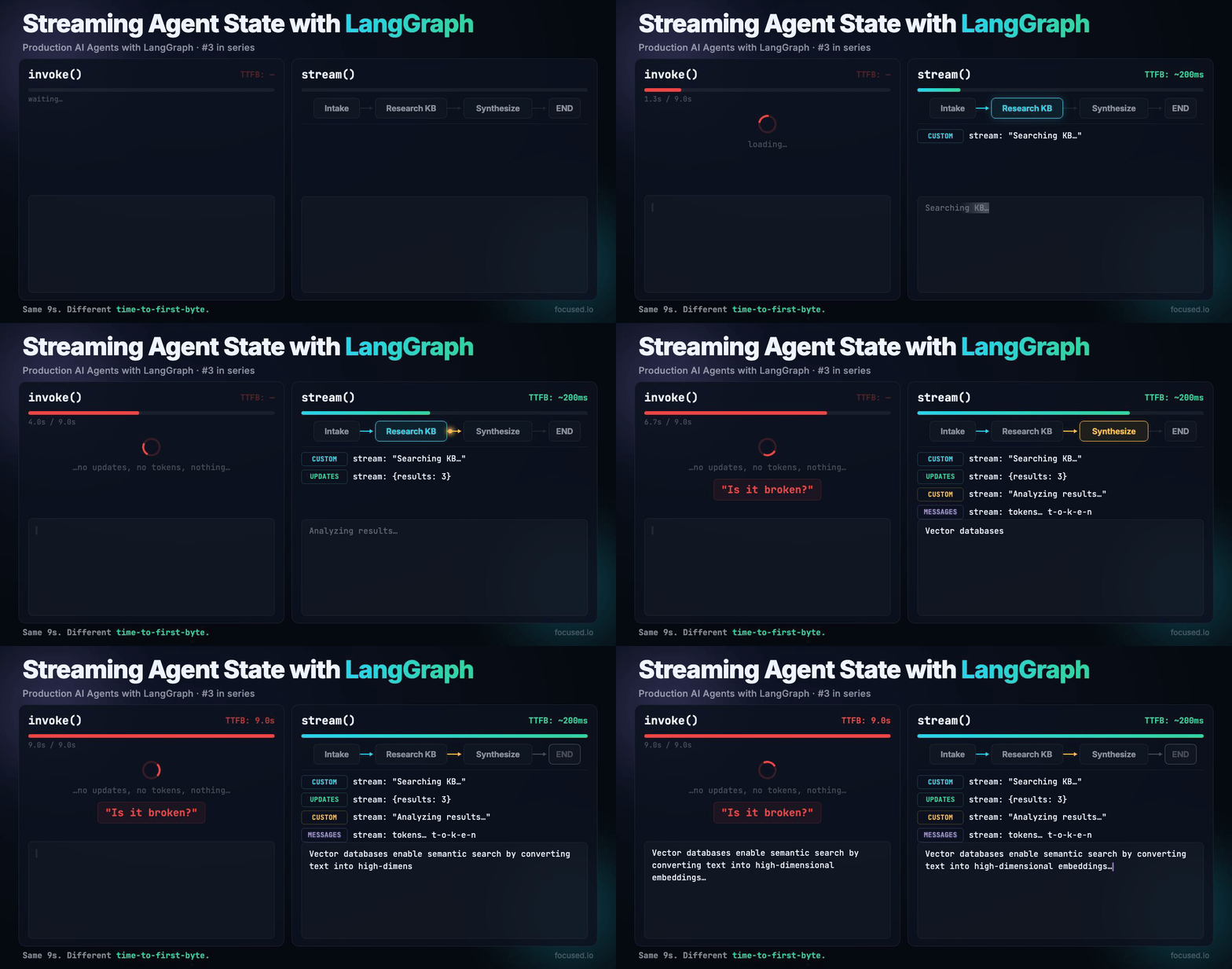
Your research agent takes 9 seconds to answer a question. It fans out to three sources, synthesizes results, returns a polished answer. The user sees a blank screen for all nine of those seconds. By second 5 they've refreshed the page, doubled your API costs, and still seen nothing.
Streaming fixes this. Show the user what the agent is doing while it's doing it: "Searching knowledge base...", "Found 3 results...", "Synthesizing..." and then stream the final answer token by token. Same 9 seconds, but the user sees progress from millisecond 200.
The Perception Math
Identical work, different user experience:
What we're Building
A multi-step research agent that streams three types of events to the UI: node-level progress updates, custom status messages from inside nodes, and token-by-token LLM output for the final synthesis.
                          ┌─ stream: "Searching KB..."
[Intake] → [Research KB]  ┤
                          └─ stream: {results: 3}
                                    ↓
                          ┌─ stream: "Analyzing results..."
         → [Synthesize]  ┤
                          └─ stream: tokens... t-o-k-e-n-b-y-t-o-k-e-n
                                    ↓
                                     → END
Three stream modes run simultaneously: updates for graph state changes, custom for application-specific progress events, and messages for LLM token streaming.
The Five Modes
LangGraph exposes five stream modes. You'll use three in practice:
In production, use ["updates", "custom", "messages"]. values sends the entire state on every step. debug is for development.
The Code
State and two nodes: a research step that emits custom progress events, and a synthesizer that streams its LLM response token by token.
from typing import TypedDict

from langchain_anthropic import ChatAnthropic
from langchain_core.messages import HumanMessage, SystemMessage
from langgraph.config import get_stream_writer
from langsmith import traceable

llm = ChatAnthropic(model="claude-sonnet-4-5-20250929", temperature=0)


class State(TypedDict):
    question: str
    research: str
    answer: str
The research node uses get_stream_writer() to push status updates to the client. These show up in the custom stream mode:
@traceable(name="research", run_type="chain")
def research(state: State) -> dict:
    writer = get_stream_writer()

    writer({"step": "research", "status": "starting", "message": "Searching knowledge base..."})

    response = llm.invoke([
        SystemMessage(
            content="You are a research assistant. Search for relevant information "
                    "about the user's question. Return a concise summary of findings."
        ),
        HumanMessage(content=state["question"]),
    ])

    writer({"step": "research", "status": "complete", "message": "Research complete."})

    return {"research": response.content}
The synthesizer uses the LLM normally. LangGraph automatically streams its tokens when messages mode is active:
@traceable(name="synthesize", run_type="chain")
def synthesize(state: State) -> dict:
    writer = get_stream_writer()
    writer({"step": "synthesize", "status": "starting", "message": "Synthesizing answer..."})

    response = llm.invoke([
        SystemMessage(
            content="Synthesize the research into a clear, actionable answer. "
                    "Be concise but thorough."
        ),
        HumanMessage(
            content=f"Question: {state['question']}\n\nResearch:\n{state['research']}"
        ),
    ])

    writer({"step": "synthesize", "status": "complete", "message": "Done."})
    return {"answer": response.content}
Graph Assembly
from langgraph.graph import StateGraph, START, END

builder = StateGraph(State)

builder.add_node("research", research)
builder.add_node("synthesize", synthesize)

builder.add_edge(START, "research")
builder.add_edge("research", "synthesize")
builder.add_edge("synthesize", END)

graph = builder.compile()
Multi-mode Streaming
A single .stream() call can emit node updates, custom progress events, and LLM tokens simultaneously:
for mode, chunk in graph.stream(
    {"question": "What are the key differences between REST and GraphQL for mobile APIs?"},
    stream_mode=["updates", "custom", "messages"],
):
    if mode == "updates":
        # Node completed — chunk is the state delta
        node_name = list(chunk.keys())[0]
        print(f"[node] {node_name} completed")

    elif mode == "custom":
        # Custom progress event from get_stream_writer()
        print(f"[status] {chunk.get('message', chunk)}")

    elif mode == "messages":
        # LLM token — chunk is a tuple of (message_chunk, metadata)
        message_chunk, metadata = chunk
        if hasattr(message_chunk, "content") and message_chunk.content:
            print(message_chunk.content, end="", flush=True)
Note that the output shape changes with multi-mode. Single mode (stream_mode="updates") yields chunks directly. Multi-mode (stream_mode=["updates", "custom"]) yields (mode, chunk) tuples. Code that works with single mode breaks with multi-mode because the unpacking is different.
Async streaming
For production APIs, use astream with async for:
import asyncio

from langsmith import traceable


@traceable(name="stream_research", run_type="chain")
async def stream_research(question: str):
    chunks = []
    async for mode, chunk in graph.astream(
        {"question": question},
        stream_mode=["updates", "custom", "messages"],
    ):
        if mode == "messages":
            message_chunk, metadata = chunk
            if hasattr(message_chunk, "content") and message_chunk.content:
                chunks.append(message_chunk.content)
                yield {"type": "token", "content": message_chunk.content}
        elif mode == "custom":
            yield {"type": "status", "content": chunk}
        elif mode == "updates":
            yield {"type": "node_update", "content": chunk}


async def main():
    async for event in stream_research("How do vector databases work?"):
        if event["type"] == "token":
            print(event["content"], end="", flush=True)
        else:
            print(f"\n[{event['type']}] {event['content']}")

asyncio.run(main())
FastAPI + SSE
The standard production pattern is a FastAPI endpoint that converts graph streams to SSE. SSE is one-directional (server to client), works over HTTP/1.1, and auto-reconnects:
import json

from fastapi import FastAPI
from fastapi.responses import StreamingResponse
from langsmith import traceable

app = FastAPI()


@traceable(name="sse_research_stream", run_type="chain")
async def generate_sse(question: str):
    async for mode, chunk in graph.astream(
        {"question": question},
        stream_mode=["updates", "custom", "messages"],
    ):
        if mode == "messages":
            message_chunk, metadata = chunk
            if hasattr(message_chunk, "content") and message_chunk.content:
                data = json.dumps({"type": "token", "content": message_chunk.content})
                yield f"data: {data}\n\n"
        elif mode == "custom":
            data = json.dumps({"type": "status", "content": chunk})
            yield f"data: {data}\n\n"
        elif mode == "updates":
            node_name = list(chunk.keys())[0] if chunk else "unknown"
            data = json.dumps({"type": "node_complete", "node": node_name})
            yield f"data: {data}\n\n"

    yield "data: [DONE]\n\n"


@app.post("/research/stream")
async def stream_endpoint(payload: dict):
    return StreamingResponse(
        generate_sse(payload["question"]),
        media_type="text/event-stream",
        headers={
            "Cache-Control": "no-cache",
            "Connection": "keep-alive",
            "X-Accel-Buffering": "no",
        },
    )
Set X-Accel-Buffering: no in the response headers and proxy_buffering off in your nginx config. Without these, nginx buffers the entire response before sending it to the client and your streaming pipeline becomes a regular HTTP response.
The Bugs
These break under load.
Reverse proxy buffering
You deploy behind nginx or a cloud load balancer. SSE events arrive at the client in one big batch after the stream completes. Cause: proxy buffering is on by default. Set the X-Accel-Buffering header, disable proxy_buffering in nginx, and check your cloud provider's load balancer settings.
Message chunk ordering
With messages mode, you receive AIMessageChunk objects. The content field is usually a string, except when the model returns tool calls where it's a list of content blocks. Concatenating .content naively produces garbled output. Check isinstance(message_chunk.content, str) before concatenating and handle tool-call chunks separately.
Backpressure on slow clients
Your agent streams tokens faster than the client can consume them (mobile on 3G, overloaded browser tab). The server-side buffer grows until memory pressure kills the process. Use bounded async queues or configure your ASGI server's per-connection send buffer limits.
Mixed single/multi mode unpacking
Developer switches from stream_mode="updates" to stream_mode=["updates", "custom"] and doesn't update the unpacking code. The for chunk in graph.stream(...) now yields (mode, chunk) tuples, but the code tries to use the tuple as a dict. No error, just wrong data flowing through. Always use multi-mode from the start, even if you only need one mode today.
Observability
Stream-based workflows produce many small events. Tag your traces so you can measure stream performance in LangSmith:
from langsmith import tracing_context

with tracing_context(
    metadata={
        "stream_mode": "multi",
        "client_type": "web",
        "session_id": "sess_12345",
    },
    tags=["production", "streaming", "v1"],
):
    for mode, chunk in graph.stream(
        {"question": "Explain vector similarity search"},
        stream_mode=["updates", "custom", "messages"],
    ):
        pass  # process chunks
The LangSmith trace shows per-node timings. Use this to find nodes that are slow to emit their first token (high time-to-first-byte) vs. nodes that produce tokens slowly (low throughput).
Evals
Streaming doesn't change what the agent produces, it changes how the output is delivered. Evals verify that streamed output matches what invoke() would return, and that custom events are emitted correctly.
from langsmith import Client

ls_client = Client()

dataset = ls_client.create_dataset(
    dataset_name="streaming-agent-evals",
    description="Streaming research agent evaluation dataset",
)

ls_client.create_examples(
    dataset_id=dataset.id,
    inputs=[
        {"question": "What are the tradeoffs between REST and GraphQL?"},
        {"question": "How do vector databases enable semantic search?"},
        {"question": "What is retrieval-augmented generation?"},
    ],
    outputs=[
        {"must_mention": ["REST", "GraphQL", "tradeoff"]},
        {"must_mention": ["vector", "embedding", "similarity"]},
        {"must_mention": ["retrieval", "generation", "context"]},
    ],
)
from langsmith import evaluate
from openevals.llm import create_llm_as_judge
QUALITY_PROMPT = """\
User question: {inputs[question]}
Agent response: {outputs[answer]}
Rate 0.0-1.0 on completeness, accuracy, and clarity.
Return ONLY: {{"score": <float>, "reasoning": "<explanation>"}}"""
quality_judge = create_llm_as_judge(
prompt=QUALITY_PROMPT,
model="anthropic:claude-sonnet-4-5-20250929",
feedback_key="quality",
)
def coverage(inputs: dict, outputs: dict, reference_outputs: dict) -> dict:
"""Did the response address the key topics?"""
text = outputs.get("answer", "").lower()
must_mention = reference_outputs.get("must_mention", [])
hits = sum(1 for t in must_mention if t.lower() in text)
return {"key": "coverage", "score": hits / len(must_mention) if must_mention else 1.0}
def stream_completeness(inputs: dict, outputs: dict, reference_outputs: dict) -> dict:
"""Does streaming produce the same output as invoke?"""
streamed = outputs.get("answer", "")
invoked_result = graph.invoke({"question": inputs["question"]})
invoked = invoked_result.get("answer", "")
# Exact match is too strict — LLM outputs vary. Check key content overlap.
streamed_words = set(streamed.lower().split())
invoked_words = set(invoked.lower().split())
if not invoked_words:
return {"key": "stream_completeness", "score": 1.0}
overlap = len(streamed_words & invoked_words) / len(invoked_words)
return {"key": "stream_completeness", "score": min(overlap, 1.0)}
def custom_events_emitted(inputs: dict, outputs: dict, reference_outputs: dict) -> dict:
"""Were custom status events emitted during streaming?"""
events = outputs.get("custom_events", [])
expected_steps = {"research", "synthesize"}
seen_steps = {e.get("step") for e in events if isinstance(e, dict)}
coverage_score = len(seen_steps & expected_steps) / len(expected_steps)
return {"key": "custom_events", "score": coverage_score}
def target(inputs: dict) -> dict:
custom_events = []
answer_chunks = []
for mode, chunk in graph.stream(
{"question": inputs["question"]},
stream_mode=["updates", "custom", "messages"],
):
if mode == "custom":
custom_events.append(chunk)
elif mode == "messages":
message_chunk, metadata = chunk
if hasattr(message_chunk, "content") and message_chunk.content:
answer_chunks.append(message_chunk.content)
elif mode == "updates":
if "synthesize" in chunk:
pass # answer is captured via message chunks
return {
"answer": "".join(answer_chunks) if answer_chunks else "",
"custom_events": custom_events,
}
results = evaluate(
target,
data="streaming-agent-evals",
evaluators=[quality_judge, coverage, stream_completeness, custom_events_emitted],
experiment_prefix="streaming-agent-v1",
max_concurrency=4,
)
stream_completeness verifies that the streaming path produces equivalent output to invoke(). This catches bugs where stream chunking drops content, like an SSE serializer silently truncating chunks that exceed a size limit.
When to Stream
Use streaming for any user-facing agent interaction over 2 seconds, multi-step agents where progress indicators reduce perceived latency, and chat interfaces where token-by-token display is expected.
Skip it for background jobs with no user waiting, when latency is already under a second, and when the output is structured data rather than natural language.
TL;DR
Three modes in production: updates for node transitions, custom for progress events via get_stream_writer(), and messages for token streaming. Combine them with stream_mode=["updates", "custom", "messages"].
Deploy behind FastAPI + SSE with X-Accel-Buffering: no. Watch for reverse proxy buffering, backpressure on slow clients, and the single-to-multi mode unpacking change.
Technical References:
We’ll use the information you provide to respond to your enquiry. Learn more about how we handle your personal data in our Privacy Policy.
/Contact Us

Modernize your legacy with Focused
Get in touch