Blog
Agent UI Is Runtime Infrastructure
Token streaming makes an agent look alive. Typed event streams make agent products usable, inspectable, recoverable, and safe enough to run inside real workflows.
May 22, 2026
Agent product spinners tell the truth badly.
There’s this common pattern in agent UX: a person clicks a button and after a few moments a spinner shows up in the center of the page and the product locks up. The user has no idea what tool is running, what changes are happening in the system, what subagents or agents are involved. Later on the team can go back and read through a long transcript to figure out what happened. It’s better than nothing, but ultimately useless for a human doing real work with real deadlines.
Token streaming solves the model-call UX problem and makes the answer feel more alive as the model writes out the answer. But agent products have a wider problem: the work of an agent to produce output happens across tools, subagents, checkpoints in a workflow, patches of state, approval gates, background jobs, reconnectable sessions, and different applications that a person is staring at to see the results of the agent’s work.
This problem has been named by LangChain in its post "From Token Streams to Agent Streams". Generative UI cannot be a pretty wrapper around a transcript. The UI/runtime boundary needs a contract.
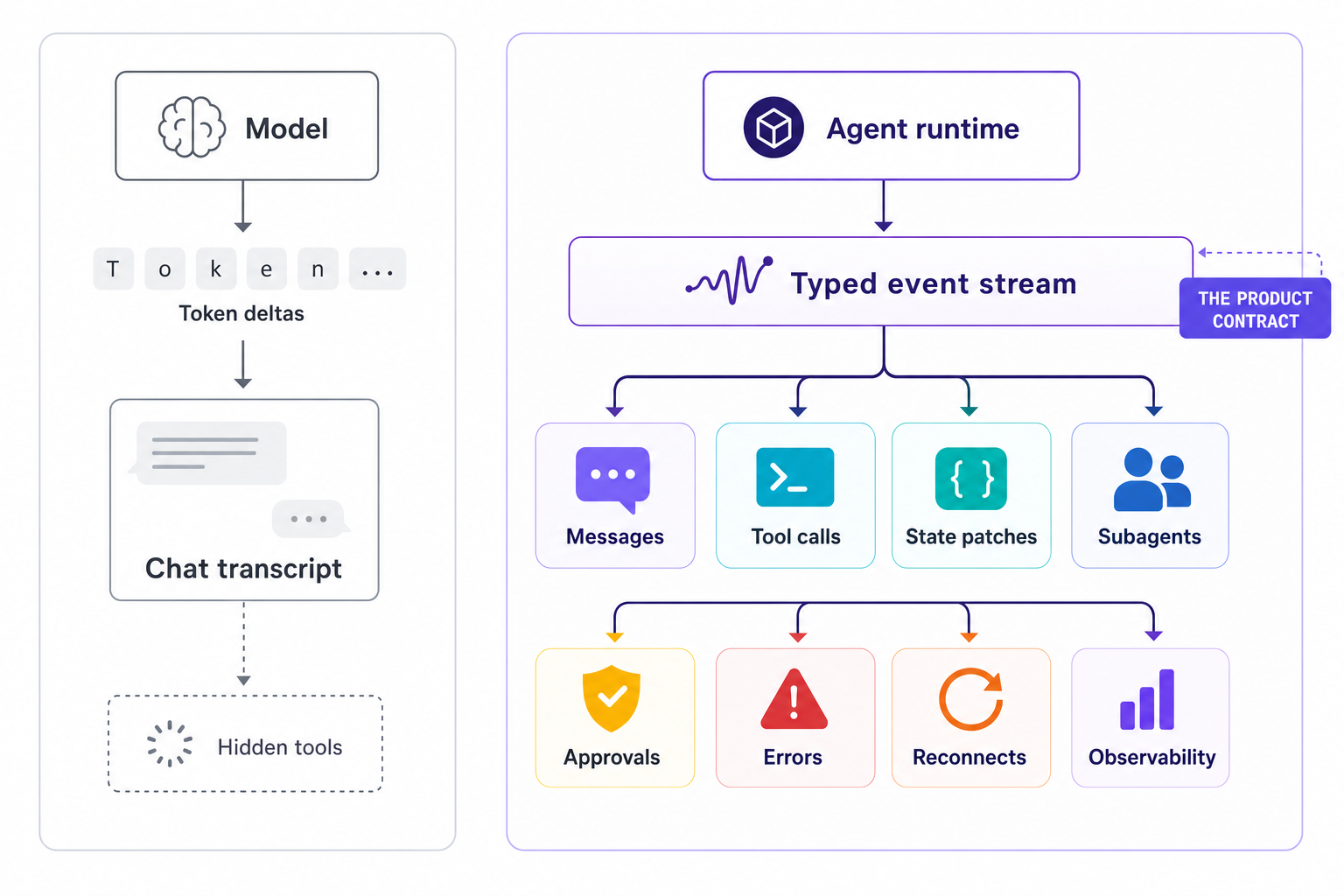
A transcript can render text. An agent product has to render work.
Old chat UI worked because a user posted a message and waited for assistant text. During generation, tokens appended to the current thread until the assistant finished.
The easy chat app shape gets destroyed as soon as work gets added to the agent.
A support agent looks up account info, checks SSO configuration, opens a ticket, asks for approval to change a plan, adds a note to Salesforce, and waits for billing API to return info. Agent text output during that time is a small fraction of the work done by product to service that request. What matters is the entire path through product taken by that request: billing call, approval card, changed account info, ticket ID, and then finally the response to the agent’s question. A spinner with a blank text input and a dribble of tokens is poor UI for that experience.
This problem is already apparent in latency-prone chat agents, which are implemented as single-threaded bots that process requests one at a time. Even if the final response is correct, single-threaded support bots are an architecture smell, and event streams are just the UI version of the same problem: the frontend needs to see the product surface evolve in real time as the agent processes events in parallel, not after the fact as a single log entry.
This becomes clearer reading LangChain’s event streaming docs, as they outline this API boundary for new application and frontend work. LangChain recommends stream_events(..., version="v3"), which returns typed projections for messages, tool calls, state values, subgraphs, custom projections, and final output. The application then renders the projection it has been given to display to the user, instead of parsing through the individual chunks of the run and branching based on different text blocks.
stream = agent.stream_events(
    {"messages": [{"role": "user", "content": "Check the renewal risk for Acme"}]},
    version="v3",
)

for name, item in stream.interleave("messages", "tool_calls", "values"):
    if name == "messages":
        render_assistant_text(str(item.text))
    elif name == "tool_calls":
        render_tool_card(item.tool_name, item.input, item.output, item.error)
    elif name == "values":
        update_state_panel(item)

final_state = stream.output
This lets the front end promise something different than text streaming to a transcript. The transcript can be updated with text in real time. Tool calls can be surfaced as cards with progress and failure states. The latest state of the application can be rendered in real time. Errors can be surfaced with controls to retry. Final output can close the loop.
The code shape matters because instead of a frontend parsing logs, it subscribes to product nouns.
The event stream needs nouns.
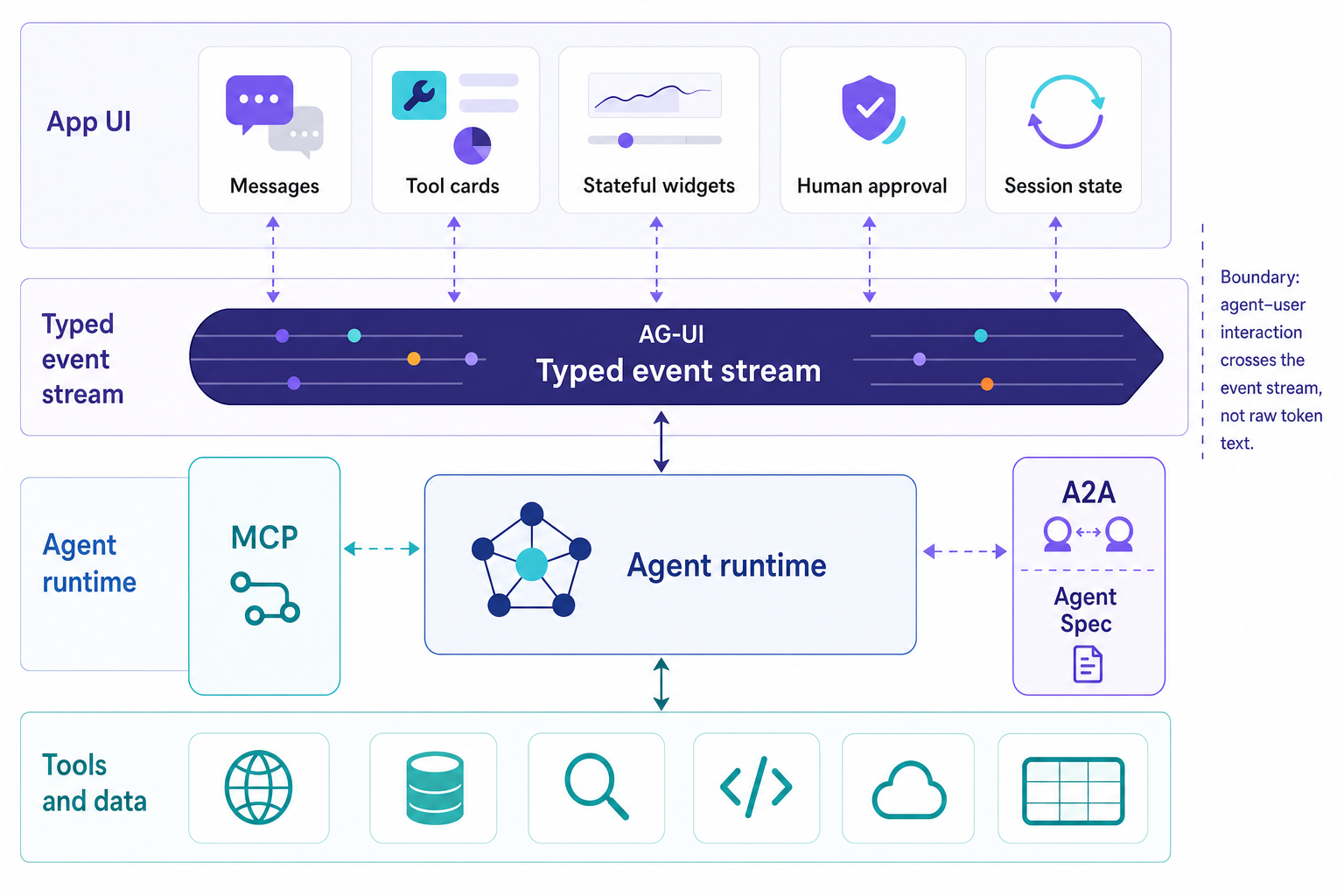
A useful agent stream would contain information about the lifecycle of the agent, text messages, tool calls, state, activity, reasoning behind decisions, custom events, and errors. AG-UI, the Agent-User Interaction Protocol, is the cleanest current example of this vocabulary. Its docs describe event-based architecture where events are the fundamental communication units between agents and frontends, with lifecycle events, text message events, tool call events, state management events, activity events, reasoning events, special events, and draft extensions that are still under construction.
Again, the lifecycle portion of the events is more important than it may initially seem. A run can start. Steps start and end. Text chunks attach to a message ID. Tool calls start, finish, error, or disappear. State lands as deltas against the user-facing model of the world. A run can end, interrupt, or fail. The UI can behave like software instead of a chat window watching smoke signals.
AG-UI did not show up by accident. CopilotKit introduced it as a protocol for streaming a single JSON event sequence over standard HTTP or an optional binary channel, carrying messages, tool calls, state patches, and lifecycle events generated during an agent run. The protocol is also supported by Microsoft’s Agent Framework for remote agent hosting. The framework supports real-time streaming over SSE, session and state management, human-in-the-loop approvals, shared state, predictive state updates and tool-based generative UI.
There is also an enterprise adoption signal here. Agent frameworks are being judged by the event contract that their authors expose to application developers, not by the React widgets they use to build a demo application.
Generative UI makes the frontend part of the runtime boundary.
The term “generative UI” is abused because people believe that the model is painting components in front of them. But the useful part is the boring part. How does work happen in the frontend vs. the backend? How does approval work? How does writing state work? And what can be retried here?
AG-UI’s tool model gives the frontend a way to define client-side tools and let the agent request them through a structured lifecycle. The AG-UI tool docs describe tool schemas, tool calls, and frontend-defined tools that let the application keep sensitive operations under product control while the agent reasons over the interaction.
That boundary is significant. The calendar component exposing “propose meeting times” doesn’t grant the agent write access to the calendar. The billing page for plans exposing “prepare plan change” requires a human approval event before commit. The data table with rows and columns for accounts in a given timeframe can expose “filter this segment” as a UI operation, as opposed to a backend mutation that changes the underlying data, and have the agent ask for it and the product decide to allow it and have the resulting events recorded in the stream of events.
Once the run context is known, the screen can reflect state, permissions, intermediate artifacts, and interaction history. This is where context starts replacing static design. The UI cannot be drawn once and left alone. It has to change in response to each step of the run and the events generated by those steps.
Subagents make transcript thinking collapse.
The transcript model gets messier with subagents in the product.
A supervisor might define a task to research a problem, look up a policy, analyze an account, and then plan a series of remediations. The tradeoffs for multi-agent orchestration with LangGraph were laid out in a recent architecture piece. The problem for the UI of such a task is similar to that of a chat transcript. When work is delegated to subagents, the work can be flattened into a single transcript, but this flattening obscures important information about the hierarchy of tasks, which are currently blocked, which have completed, and what results were generated by which child run.
Deep Agents can handle the UI problem that arises when work is split off to subagents by treating the stream of each subagent as a separate first-class projection. The docs say stream.subagents exposes one stream handle per delegated task, with scoped messages, tool calls, values, nested subagents, output, path, and lifecycle status. This means a UI could show the effect of the supervising agent’s work, then show off the work that the various child agents did as separate cards, and then drill down into any subagent’s stream without subscribing to the stream of every other subagent as well.
Reconnects and traces belong in the same design conversation.
Agent runs continue after a browser tab has been closed, run into problems with flaky API connections, have a human manually intervene at a particular point, and continue after a product update has been deployed. They can fail partially in the course of completing a write. So too the stream of UI events corresponding to a given agent run must also be resumable, corresponding to the fact that runs are themselves resumable.
This is where the event contract turns into production infrastructure. To follow runtime work, the contract has to map run IDs, thread IDs, parent run IDs, and step names. Ordered value deltas, tool calls, outputs, and results have to be tracked so the frontend does not duplicate side effects. When the UI generates a customer-visible action, it should trace back to the run, using the same identifiers that appeared in the tool card showing the “billing API failed” error.
Honeycomb’s agent work points in the same direction. Its Agent Timeline product frames agent debugging as a flight recorder. The same information used to present active work in the UI can be displayed in a review of an incident that involved that agent. If the UI showed a step title and the “billing API failed” tool card, these same run, step and tool identifiers are necessary in the trace for the subsequent steps to accurately present the work done by the agent.
Integrated agents raise the bar here. In the integrated-agent piece, the point was that agents deliver value when they operate within existing enterprise systems and workflows. Processing work through a UI is not enough. The tool’s event stream has to integrate with the product, the platform, and the observability system. They need the same event contract.
What to demand from an AI agent framework.
The buying checklist is getting sharper.
Can the framework stream messages, tool calls, state patches, subagent progress, approvals, errors, custom domain events, and final output as typed projections?
Can a product subscribe to a subagent, tool call, or state channel without draining the entire run, then reconnect later with the correct run IDs, state, and pending interrupts?
Can frontend tools stay under application control while the agent requests them through a documented schema?
Can event identifiers map cleanly into traces, logs, eval records, and incident tickets?
Does the frontend UI produce useful UI for product work even for partial completion of work by an AI agent?
A token stream makes things look active. An agent event stream gives a product handles.
Generative UI needs these handles: lifecycle events for run boundaries, tool events for actions performed through tools, state events for shared context, subagent events for delegated work, approval events for control, error events for recovery, and observability hooks for the receipts.
A chatbox is okay. People know how to use a chatbox. But a chatbox cannot be the UI for an agent-based product.
Make the stream a contract. Then build the UI on purpose.
We’ll use the information you provide to respond to your enquiry. Learn more about how we handle your personal data in our Privacy Policy.
/Contact Us

Modernize your legacy with Focused
Get in touch